By Matt Emgi · Updated November 2026
In this post, agentic search means an AI agent doing the searching, reading and shortlisting for a buyer, then acts on what it finds. To see what that means for a SaaS website, I gave Anthropic’s browser agent a real software buying task. It found two pricing traps, hit a vendor with no prices at all, and couldn’t book a call on my own site. That last one stung, so it’s in here too.
Key Takeaways
- “Agentic search” means three different things online. This post covers agents that act for buyers, applied to B2B SaaS.
- In my test, Google’s first page was three ads and vendor-written listicles, with no AI Overview. The vendors the agent then opened were ones those listicles kept naming.
- Two pricing pages could mislead an agent: one hides an exclusion in styling, the other contradicts itself. A third published no prices, so the agent couldn’t qualify it.
- Our own Calendly booking embed was unreadable to the accessibility-tree reading I tested. The fix is a plain booking link beside the embed.
- Agents read the same page differently: plain text missed Otterly’s “not included”, the accessibility tree caught it.
What is agentic search? (It means three different things)
Agentic search is search done by an AI agent instead of a person: it plans queries, reads pages, compares options and may act on the result. The term is muddled because three camps use it. Ahrefs’ agentic SEO guide (May 2026) means agents doing SEO work. Semrush’s agentic web guide (June 2026) means agents acting for buyers.
A third camp, including Respona (July 2026), uses it for AI assistants that run several searches and loop before answering. Same words, three different jobs. Here’s how I split them:
| Meaning | What it describes | Terms you’ll see |
|---|---|---|
| 1. Agents doing SEO work | Using AI agents to run audits, keyword research, content and reporting inside a marketing team. | Agentic SEO, agentic marketing |
| 2. AI that researches, then answers | An assistant plans its own searches, reads results, loops, then writes one answer. | Agentic search |
| 3. Agents that act for buyers | An agent browses vendor sites, compares plans, fills forms or books calls on someone’s behalf. | Agentic search (as this post uses it), agent experience (AX), agentic engine optimisation |
This post is about the third meaning, for B2B SaaS. The second matters too, and it overlaps with what we’ve written on how AI assistants fan out queries. But the third is where your website stops being something people read and starts being something software operates.
“Agent experience” is the useful phrase: UX for visitors who are software. Can an agent find the price, understand the plan and reach the form? “Agentic engine optimisation” is improving that. And every protocol and worked example I found was retail checkout. I couldn’t find anyone who’d tested an agent on a SaaS pricing page and demo form, so I did.
What happened when I gave an AI agent a SaaS buying task?
On 10 November 2026, I gave Claude in Chrome, Anthropic’s browser agent, one brief. It ran inside my normal Chrome, logged in to Google. Across three vendor sites and ours, it met a cookie prompt on every vendor site, found one vendor with no prices, and couldn’t read the booking calendar on ours.
The exact task was:
“Find an AI visibility tracking tool with API access under $500/mo, get exact price, get to the demo/trial form, do not submit.”
I picked AI visibility tools because I know the category well enough to check the agent’s work. I’m reporting what each page exposed to the agent. This was one run, one agent, one task, on one day, so treat it as a field note, not a benchmark.
Step 1: Google’s first page was ads and vendor-written listicles
The agent searched “ai visibility tracking tool with api pricing”. The results page had three sponsored results (Promptwatch, Ahrefs and DataForSEO) and no AI Overview. The organic first page was almost entirely vendor-written comparison listicles, plus a Semrush pricing page.
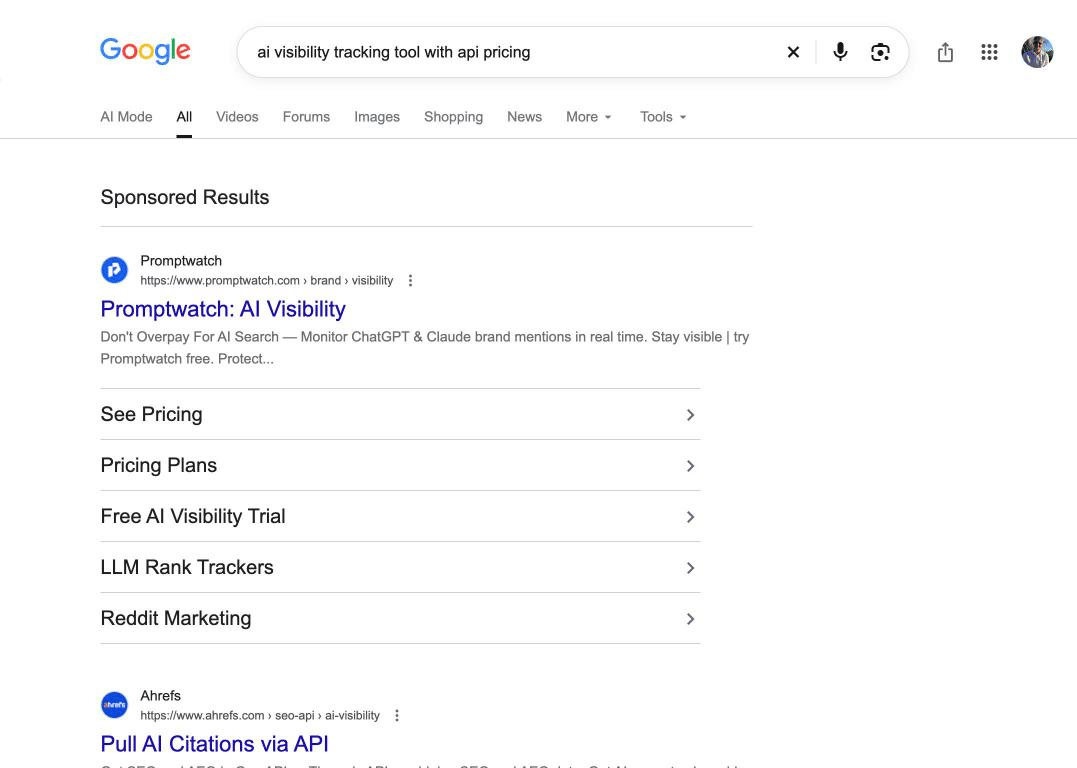
So the page the agent started from was made of ads and vendor-written listicles. The three vendors it opened next, Otterly, Peec and Profound, were names those listicle snippets kept repeating; none of them were the ads. That’s not new for human buyers. It just matters more when the “buyer” is software that can read every list on page one and never gets bored.
Step 2: Otterly’s pricing page hid a trap in grey
Otterly’s pricing page was fully readable as text. Lite costs $29 for 20 prompts. Standard is $189 with 160 prompts and 2,000 API requests a month. Premium is $489 with 535 prompts and 5,000 API requests, and Enterprise is custom. A cookie notice with a “Got it” button sat over the content.
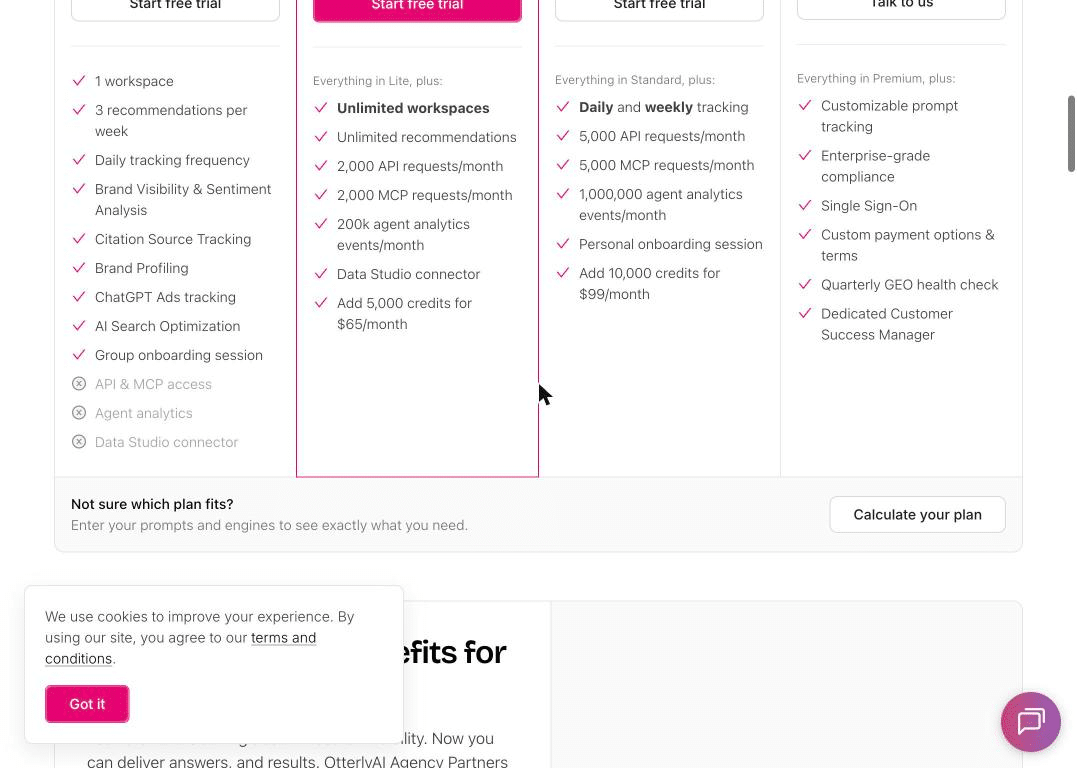
The trap is on the Lite card. It lists “API & MCP access”, greyed out with an X icon, meaning not included. A human sees that instantly. But plain text extraction of the page shows the words with no marker at all. A text-only reader would have no way to tell the $29 plan excludes API access.
The accessibility tree tells a different story. It labels that line “Not included”, so an agent reading the tree gets it right. Same page, two readings, two answers about a hard requirement. The page is fine for humans. The meaning just lives in styling.
Step 3: Peec’s plan cards and comparison table disagreed
Peec prices in euros: Starter at €85, Pro at €205, Advanced at €425 and custom Enterprise. The site opened with a cookie modal offering “Deny” or “Allow all”. The agent declined. The budget was in dollars and the prices are in euros, so any agent has to convert before it can compare.
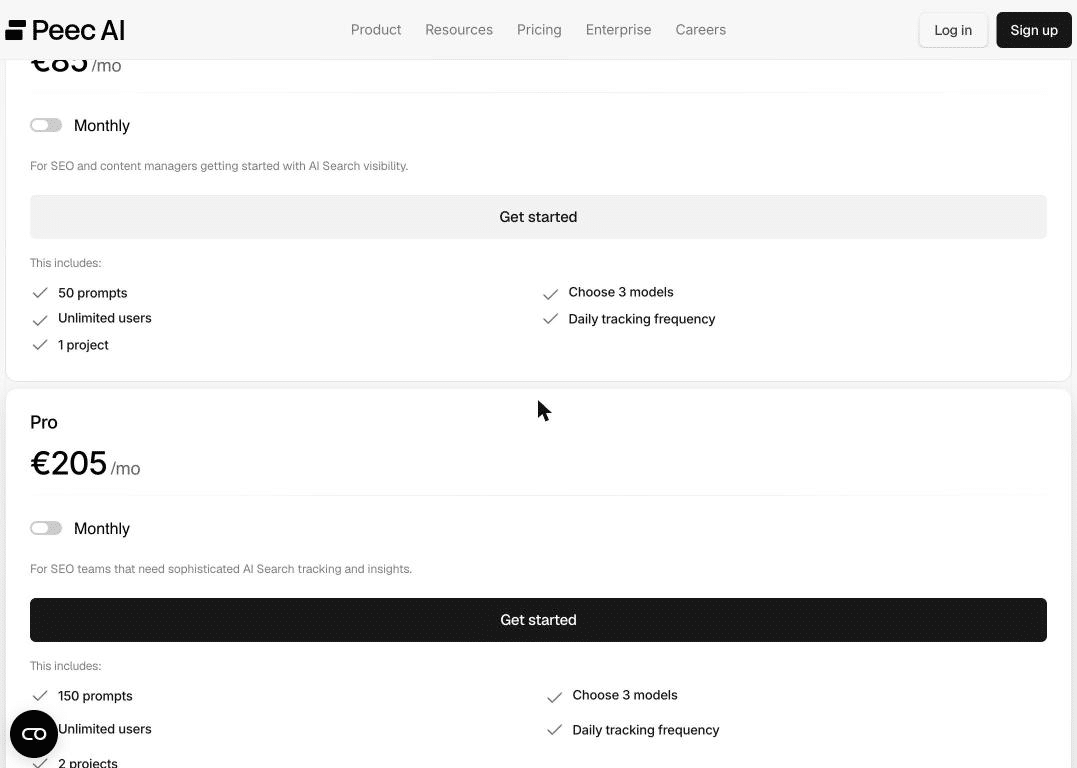
The plan cards list “API access” only under Enterprise. The comparison table further down shows API as not included on Starter but included on Pro, Advanced and Enterprise. An agent that stops at the cards rules Peec out. One that reads the table finds a qualifying plan at €205.
When two parts of your page disagree, you don’t get to choose which one the agent believes.
Step 4: Profound published no prices, so it couldn’t be qualified
Profound’s pricing page showed no prices. There was a free trial (50 prompts daily for 7 days) and an Enterprise tier marked “Custom”, with three “Get a Demo” buttons. It also opened with a cookie modal, which the agent rejected. Our own notes from August 2026 had Profound listed at $99 and $399; those public prices have since gone.
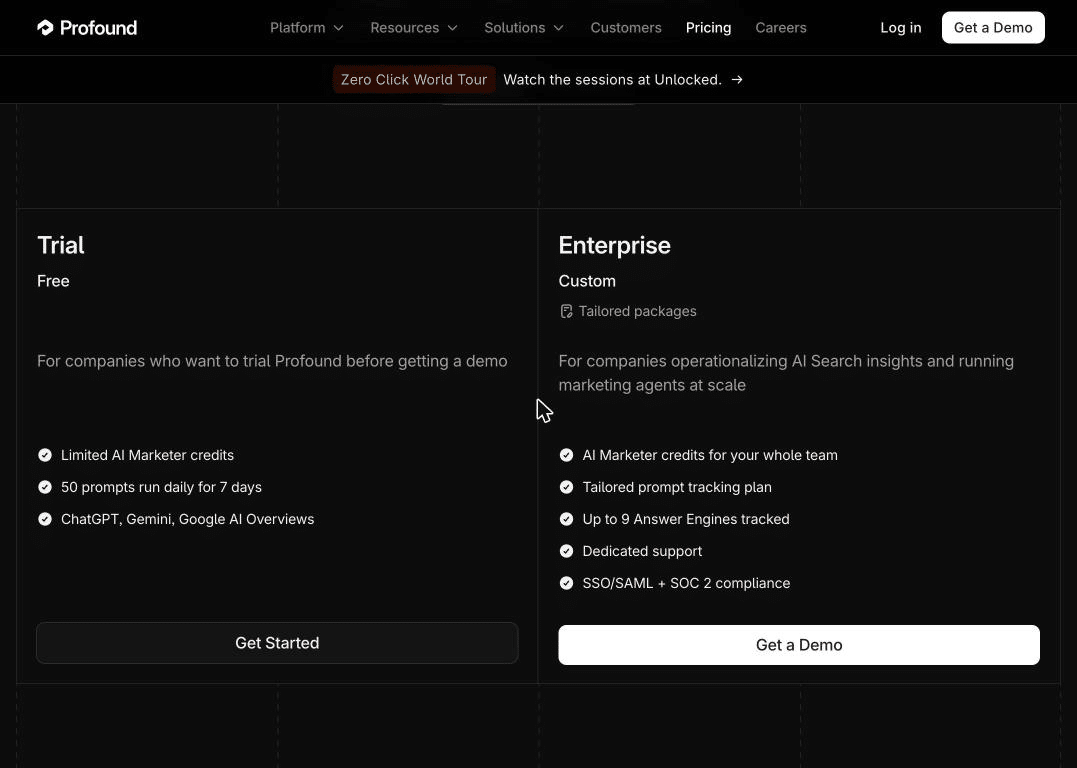
The agent couldn’t qualify Profound against a $500 budget. Removing public prices is a sales choice, and it is common in enterprise software. But in a shortlist built by software, my read is that “unknown price” will often look a lot like “doesn’t fit”.
The irony is that this assistant recommends Profound often. In an EMGI panel run the same day (8 buyer prompts about AI visibility tools, 5 runs each), Profound was named in 18 of 40 answers (45%, roughly 31% to 60% at 95% confidence) from OpenAI’s gpt-5.4-mini with web search, so treat it as directional. That’s the API model, not the consumer ChatGPT app. The assistant puts it on the list. The agent can’t price it.
Step 5: Profound’s demo form was the best thing in the test
Profound’s form was the best-built page in the test. The “Get a Demo” route led to a contact-sales page with a native HTML form. Every field was labelled: full name, work email, company, company size, a required “How did you hear about Profound?” text box and an agency checkbox. There was no iframe and no visible CAPTCHA. An agent could fill it.
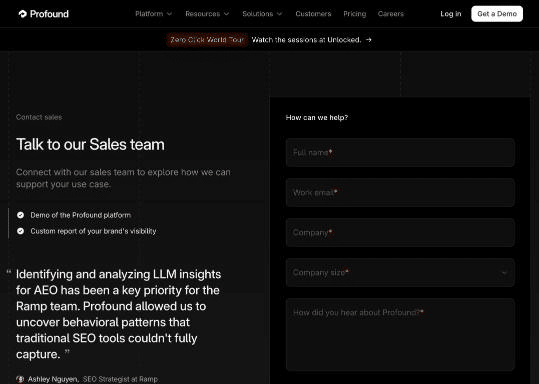
The one snag is attribution. That required “how did you hear about us” field asks the agent something only the human knows. I told the agent not to submit, so I didn’t see what it would put there. My guess is it either stops to ask or writes something plausible, and either way the self-reported attribution that sales teams rely on gets noisier as agents fill more forms.
Step 6: Our own booking page failed the test
Then I pointed the agent at our audit page. The prices are on the page as plain text (seven dollar-sign mentions), so an agent can qualify us. But booking happens inside a cross-origin Calendly iframe. From our page, the accessibility tree exposed only “Select a Date & Time – Calendly”. No dates, no times.
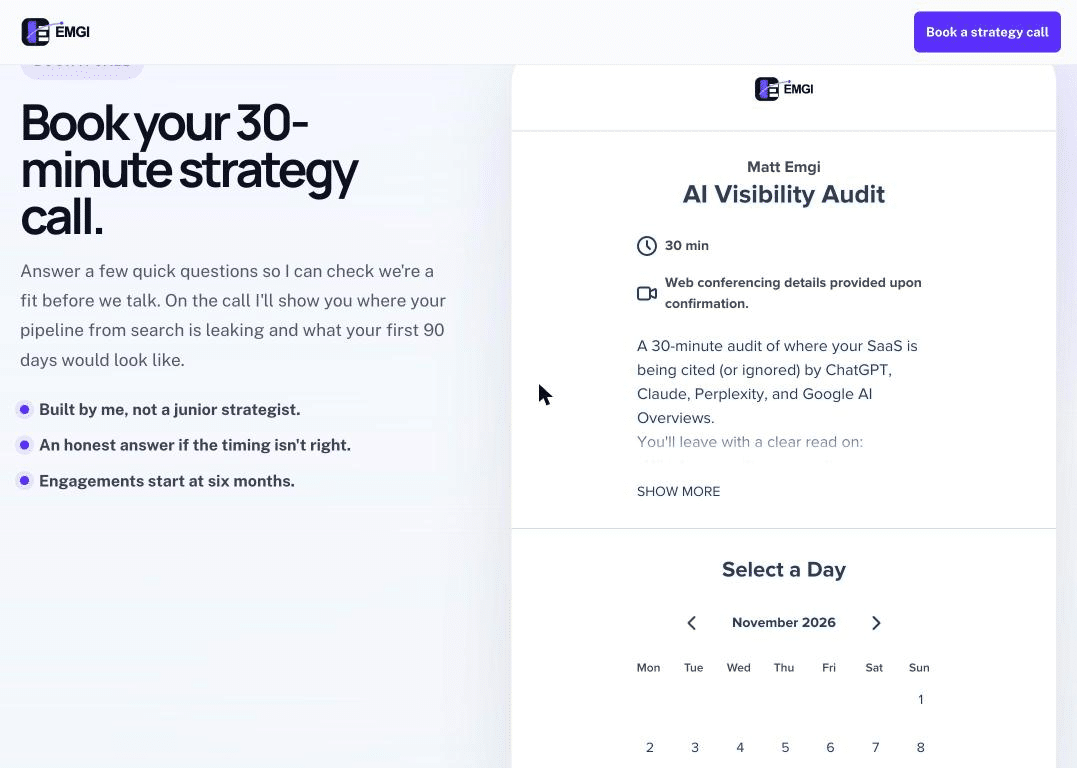
A text or DOM-reading agent can’t book a call with us. Only one that takes screenshots and clicks on what it sees could get through. Our own funnel isn’t agent-ready, and the fix is simple: a plain link to the booking page next to the embed. I’d rather publish that than test everyone except ourselves.
The scorecard
| Site | Prices the agent could read | API plan under $500? | What could trip an agent up |
|---|---|---|---|
| Otterly | $29 / $189 / $489 / custom | Yes: Standard, $189 and Premium, $489 | Lite’s missing API access is shown only by grey styling and an X icon, so plain-text extraction loses it |
| Peec AI | €85 / €205 / €425 / custom | Yes: Pro, €205 (per the table) | Cards say API is Enterprise-only; the table says Pro and up |
| Profound | None published | Unknown | No prices; demo-only route; required “how did you hear” field |
| EMGI (us) | Yes, in page text | Not applicable | Booking only inside a cross-origin Calendly iframe |
All three vendor sites put a cookie prompt in front of the agent: a “Got it” notice over Otterly’s content and consent modals on Peec and Profound, which the agent declined. Each one is an extra step, and a decision the agent makes on your buyer’s behalf.
What did the test show about how agents read SaaS sites?
The biggest lesson is that agents read your site in at least three ways, and each sees a different page. On Otterly, plain text missed an exclusion that the accessibility tree caught. On our page, a cross-origin iframe exposed one line of title text. Only screenshot-and-click agents see roughly what humans see.
Your accessibility tree is now part of your sales funnel
The accessibility tree is the structured version of your page that screen readers use. Google’s Search Central team said in May 2026 that its new AI features guide includes “initial guidance related to AI agents, a quickly emerging and evolving space“. Agents are reported to read pages through rendering, the DOM or the accessibility tree (I haven’t found a primary source for exactly how each one does it), and my test showed how much that choice changes the answer.
If meaning lives only in colour, icons or position, some agents won’t get it. Proper labels, real text for “not included” and semantic HTML were always good accessibility practice. Now they also decide what an agent tells your buyer about your pricing.
AI assistants check your own site before they trust you
Assistants don’t just read listicles. In the same EMGI panel, the model’s hidden fan-out searches included “site:profound.com AI visibility platform official” and “site:peec.ai AI visibility official”. It went to vendors’ own sites to verify them. That’s where a contradictory plan table, like Peec’s, starts to matter.
It fits what we found on how ChatGPT picks software to recommend. My read is that third-party pages get you considered. Your own pages confirm or contradict what the assistant was told.
The shortlist is still built away from your site
Step 1 is a reminder that agentic search doesn’t replace the off-site work. The agent’s starting page was ads and listicles. And ranking alone doesn’t carry you into AI answers: our study of 150 SaaS companies across 120 keywords found 44% of brands in Google’s top 10 were missing from ChatGPT.
Third-party pages get you onto the agent’s list. Your own pricing page decides whether you stay on it.
Which AI agents can act for buyers in late 2026?
Agents are real, but I found no agent that buys B2B software end to end. Cloudflare’s CEO Matthew Prince said in June 2026 that 57.4% of requests to a sample of Cloudflare sites were automated, against 42.6% human (NBC News, 2026). He called the data “a bit messy”, and it counts requests, not people.
What I could verify, and what’s only reported:
- OpenAI. The ChatGPT Atlas browser reportedly launched on macOS in October 2025. In July 2026, OpenAI said it was folding Atlas into a “ChatGPT Work” desktop app with a built-in browser and a cloud browser where agents run remotely (The Next Web, 2026). So Atlas as a standalone browser is on its way out.
- Anthropic. Claude in Chrome is the agent I used for this test. It was reportedly made generally available to paid plans in August 2026. Anthropic also released the Model Context Protocol (MCP) in November 2024, per Semrush.
- Google. Beyond the Search Central guidance above, Google has reportedly rolled out agentic checkout in the US and announced a Universal Commerce Protocol in January 2026.
- Commerce protocols. OpenAI and Stripe announced Instant Checkout and the Agentic Commerce Protocol in September 2025, reportedly starting with US Etsy sellers. WebMCP is reportedly in early preview in Chrome Canary as a W3C community draft, not production.
Every commerce protocol I found is retail checkout, and I couldn’t find a single agent built to buy B2B software end to end. For SaaS, the agent’s job today is research, qualification and getting a buyer to a form. That’s exactly where my test found the friction.
How do you make a SaaS website agent-ready?
Start with what’s evidenced: don’t block the agents your buyers use, keep pricing and plan details in readable text, and make your key forms native and labelled. In my test, the failures came from styling-only meaning, contradictory plan details, missing prices and a cross-origin iframe. None of that needs a new protocol to fix.
Most agent readiness checklists mix proven steps with guesses and present them all the same way. So every item below carries an evidence label: Evidenced (documented by the platform or vendor), Partly evidenced (supported by our test or one credible source, not proven at scale) or Speculative (plausible, no real evidence yet).
| Checklist item | Evidence | Why |
|---|---|---|
| Don’t block signed agents at your CDN or firewall | Evidenced (mechanism) | Cloudflare launched signed agents in August 2025, starting with ChatGPT agent, Goose, Browserbase and Anchor Browser. Default bot rules may catch buyer-directed agents (my inference from how signed agents work). |
| Allow OAI-SearchBot and ChatGPT-User | Evidenced | OpenAI documents both. You can still block GPTBot (training) separately. |
| Server-render pricing, features and forms | Partly evidenced | Our test showed different readers see different pages. Text in the initial HTML is the safest common ground. |
| Put prices and inclusions in words, not just styling | Partly evidenced | Otterly’s greyed-out line read as “included” in plain text. Semrush also recommends pricing in text. |
| Keep cards and comparison tables consistent | Partly evidenced | Peec’s two answers on API access meant the outcome depended on how far the agent read. |
| Specific button labels; cookie banners that don’t block content | Partly evidenced | Semrush recommends both. Every vendor in our test showed a cookie prompt first. |
| Native, labelled forms; no CAPTCHA or cross-origin iframe on key forms | Partly evidenced | Profound’s form was agent-fillable. Our Calendly embed exposed only its title. |
| Earn third-party listicles and mentions | Evidenced (for AI visibility generally) | The agent’s first page was mostly listicles, and assistants cite third-party pages heavily. |
| Structured data on pricing and product pages | Speculative (for agents) | Useful for search. Evidence that agents rely on it is weak. |
| llms.txt or markdown copies of pages | Speculative | Our study of 3,254 SaaS sites found no evidence it’s used. |
| WebMCP, NLWeb, Agentic Commerce Protocol | Speculative (for SaaS) | Early or retail-focused. Nothing B2B has shipped. |
| Measure agent visits in your logs | Evidenced (practical) | The user agents are documented, so you can count them today. |
On llms.txt, I’d hold off. Our llms.txt research across 3,254 SaaS sites explains why. Don’t let it jump the queue ahead of a pricing page that contradicts itself. For third-party mentions, our guide to directory listings and AI citations covers where that usually starts.
One more suggestion, and it’s opinion, not evidence: add “An AI assistant or agent” as an option on your “how did you hear about us” field. It won’t fix attribution, but it might tell you when an agent filled the form.
How do you measure AI agent traffic on your site?
You can measure it today from server or CDN logs, because the main user agents are documented. OpenAI lists four: OAI-SearchBot for ChatGPT search, GPTBot for training, ChatGPT-User for user-initiated fetches, and OAI-AdsBot. OpenAI notes that robots.txt rules “may not apply” to ChatGPT-User, since a person asked for the page.
A practical starting point:
- Filter logs by user agent. Count hits from ChatGPT-User and OAI-SearchBot on pricing, product and demo pages. ChatGPT-User hits are user-initiated fetches, so they are the nearest proxy for “a buyer sent an assistant here”.
- Check your CDN for signed agents. Web Bot Auth uses cryptographic HTTP message signatures so agents can prove who they are (Cloudflare, 2025). If your provider supports it, look at how those requests are treated.
- Audit your bot rules. Make sure the rule that stops scrapers isn’t also challenging the agents your buyers use.
- Watch your forms. Look for submissions with odd “how did you hear” answers or patterns that suggest an agent filled them.
Don’t rely on your analytics dashboard for this. Logs are the honest source. Logs are the honest source, because the user agents are documented. It’s the same rule we apply to which SEO metrics actually mean something: count what you can verify.
Where does agentic SEO fit with GEO and LLM SEO?
Agent readiness is the last step of the journey GEO starts. GEO and LLM SEO get your brand named and cited in AI answers; agent readiness decides whether an agent can confirm your price and reach your form afterwards.
Our breakdown of GEO versus SEO covers that distinction in depth. In practice, I’d order the work like this:
- Get on the list. Third-party mentions, listicles and citations. This is the core of our LLM SEO work, and it’s where most of the gap is.
- Make your own pages agree with each other. One answer per plan, per feature, in plain text.
- Clear the path to the form. Native, labelled fields. No booking flow that only exists inside someone else’s iframe.
- Measure. Logs first, then decide what’s worth more effort.
If you’d like to know where your brand stands in AI answers before worrying about agents, our AI visibility audit is a sensible place to start. Prices are on the page in plain text. The booking calendar is on our fix list.
One agent, one run, one task, one day. I didn’t test JavaScript rendering, server-side versus client-side pricing, other agents such as ChatGPT agent or Comet, or what the agent would have written into a form. Those are the obvious next runs.
Frequently asked questions about agentic search
What is agentic search?
Agentic search is search carried out by an AI agent rather than a person. The agent plans its own queries, reads pages, compares options and, increasingly, acts on the result by filling a form or booking a call. The term is also used for AI assistants that run several searches before answering, which is a narrower meaning.
What is agentic SEO?
Agentic SEO has two common uses. Ahrefs and others use it for running SEO work with AI agents, such as audits and keyword research. It is also used for optimising a website so AI agents acting for buyers can find, understand and use it. For SaaS, the second meaning is where pricing pages and forms come in.
How is agentic search different from GEO?
GEO (generative engine optimisation) is about getting named and cited inside AI answers. Agentic search goes a step further: the agent visits your site and tries to do something. GEO gets you onto the shortlist. Agent readiness decides whether the agent can confirm your price and reach your form once you are on it.
Can AI agents read SaaS pricing pages?
It depends on how the agent reads. In my test, plain text extraction missed that Otterly’s Lite plan excluded API access, while the accessibility tree labelled it as not included. A cross-origin Calendly iframe exposed only its title. Pricing in server-rendered text, with meaning carried in words rather than colour, is the safest bet.
Should I block AI agents?
Not by default if your buyers use them. OpenAI documents separate crawlers: GPTBot for training, OAI-SearchBot for ChatGPT search and ChatGPT-User for user-initiated fetches. You can block training while allowing search and user agents. Check your CDN too, because blanket bot rules may catch signed agents acting for real buyers.
What is agent experience (AX)?
Agent experience is how easily an AI agent can understand and operate your website on someone’s behalf. It is the agent version of user experience: readable prices, consistent plan details, clear button labels, cookie banners that don’t block content, and native forms an agent can fill without a CAPTCHA or an iframe in the way.